Laser Puzzle
Solo Project
*****
July 2026
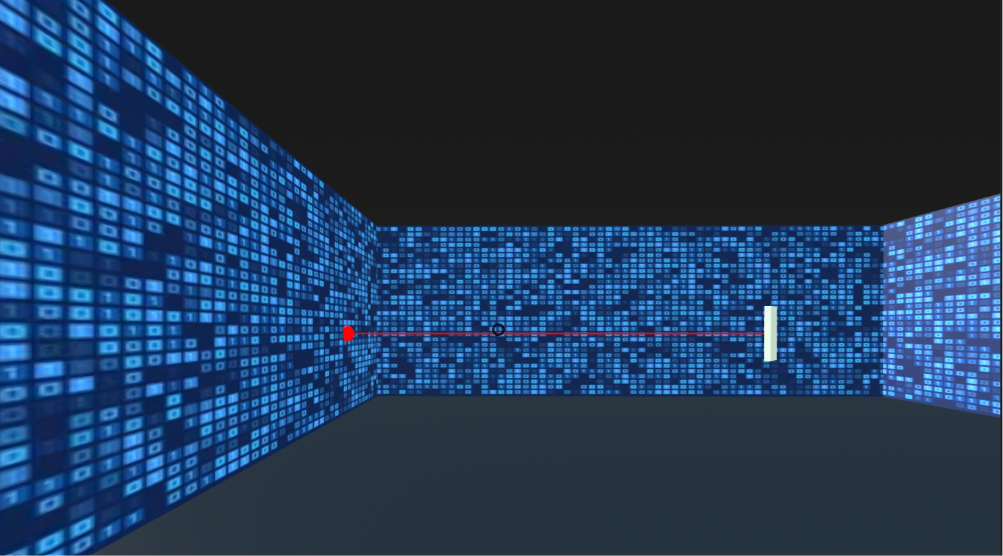 Initial Position Player Spawns To
Overview
My first exposure to WebVR, this project is a 3D laser mirror puzzle game built using A-Frame, and a little bit of JS.
The player spawns into a room with a laser emitter, a target, and several mirrors. The player can rotate the mirrors to reflect the laser beam and hit the target.
Overall, this project was a great learning experience for me, and I learned a lot about 3D web development, A-Frame, and the ECS architecture (yes there's something other than OOP)!
Origin
I'd been wanting to explore 3D web development for a while. Of course, one of the first things I stumbled across was Three.js, and C#. But I wanted to find something not-so-common, and voila, I found A-Frame!
It's been used by Google, Disney, Samsung, Toyota, and many more notable companies!
This project was my first foray into the world of 3D development, and I was excited to see what I could cook up!
Development
I started by reading the official A-Frame documentation.
One of the first things I found was that instead of using OOP, A-Frame uses an Entity-Component-System (ECS) architecture, which is a different way of thinking about programming.
Basically, instead of creating classes and objects, you create entities (which are like game objects) and attach components to them (which are like behaviors or properties).
So for example, in OOP, a bicycle class would have properties like speed, color, and methods like pedal(). In ECS, you would have a bicycle entity, and attach a speed component, a color component, and a pedal component to it.
In A-frame, each entitiy-component par is represented by
< a-entity  component1="component1-name"
component2="component2-name" >
There are several built-in entities and components both from the A-Frame library and from the community, which you can use to create your own 3D scenes. But what I really found intersting was that aside from the basic built in components, you could also create your own custom components using JS, using AFRAME.registerComponent(). For example, to register a new log component, you could do the following:
AFRAME.registerComponent('log', {
    schema: {type: 'string'},

  init: function () {
    var stringToLog = this.data;
    console.log(stringToLog);
  }
});
See here for more info.
OOOKAYYYY Enough Intro.
After a little brainstorming, I decided to build a Laser Mirror Room, because I wanted to explore the physics system in 3D development.
I found some very good resources to help me get started:
After the basics, it was mostly just about adding entities and playing around with the components to get the desired shape and position, through a lot of trial and error. It took a while to get used to because everything has a 3rd dimension to it: the z-axis.
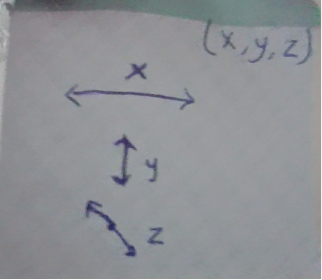 Had this by my side the whole time
Then I added JS to some of the objects for interactivity (eg pressing on a mirror rotates it). I created
a few new entities too, like 'player' for the user, and 'room-boundary' to restrict the user's environment to only the laser room.
I also found quite a few helpful libraries, like the
A-Frame 360 Image Gallery Boilerplate, and the A-frame environment component
(unfortunately I couldn't use any in this project as it was pretty unique for A-frame ig 😎, so I had to custom make my own scenes).
Then came the crashing realization: The library I was hoping to explore - Don McCurdy’s aframe-physics-system -
only handles collision detection, gravity, and rigid body dynamics. So like it's great for most dynamics required in action video games and e.t.c,
but it doesn't have a light-mirror reflection element (exactly what I needed 🙁).
1) Scrap the physics, hardcode the game logic
2) Create a custom 'physics' system for the laser beam, so that it reflects off multiple mirrors without having to manually code every possible mirror configuration.
First off, I generated the laser dynamically in JavaScript using A-Frame's line component instead of hardcoding it into the scene. This gave me complete control over how the laser behaved. Then, whenever a mirror was rotated, I recalculated the laser path based on the current state of the mirrors. And every time the scene changed, I updated the laser by answering three questions:
- Where did the laser hit?
- Which way is the mirror facing?
- Which direction should the reflected beam go?
So instead, since the mirrors only rotate in 45° increments, I made a generalized reflection system that represents the laser's direction as a vector (x, z). Whenever the beam hits a mirror, its direction vector is updated according to the mirror's rotation. If it hits a wall instead, the beam seems to stop, and if it hits the target, the game is won.
Easier said than done, it tool a lot of trial and error to get the laser to reflect correctly off the mirrors, and I had to debug a lot of issues with the reflection logic (thank god for console.log()!). And then of course, there were a lot of other things I fixed throughout the development, eg normalizing the rotation angle (so the reflection logic doesn't break if the mirror is rotated multiple times), fixing the order I put the JS code in so that things load in the right order, e.t.c.
I faced quite an issue as well with how to detect when the laser hits a mirror. I considered using Raycaster() from threejs, but it was a bit too complicated for my needs. So instead, I created my own simple collision-detection logic. Rather than checking for physical collisions, the program checks whether a mirror lies along the laser's current path by comparing its position with the laser's starting point and direction vector. If a mirror is in the laser's path, the laser stops at that mirror and a new reflected beam is calculated from there.
I then extended this logic to handle the second mirror. The program checks whether the reflected beam from the first mirror reaches the second mirror. If it does, the beam is drawn up to the second mirror and then reflected again according to the second mirror's rotation. This meant I could change the mirrors' orientations without having to manually hardcode a separate laser path for every possible combination. Target Detection added using the same idea.
Finally, I wrapped up with some enhancements, like an opening and winning message, a reset button, and a flashing button when target hit.
Lessons
I learnt quite a bit from this project, and it was definitely a great learning experience! I remember starting this project thinking it would be simple and finished in 3 days, but it turned out to be a lot more complex than I expected. Some highlights:
- A-Frame only gives the structure, and JS determines how it behaves. Techinically A-Frame is great for builing the framework of your 3D web app, but it doesn't have a lot of built-in functionality, so you have to often have tobuild a lot of things yourself.
- Start simple and then iterate to add features. If you try to add in all your functionality at once, it becomes overwhelming and difficult.
- The order you put your JavaScript code in can affect how the application behaves!!! I can't count how many times I fell into this trap.
- ECS is use in game development because unlike 2D apps which have fixed behaviour, 3D apps have a lot of moving parts, and ECS allows for more flexibility and scalability. For me this was new, and took some time to wrap my hear around.
- I also found it really cool exploring how A-frame was built on Javscript, see here for more info. I'd learned about building languages based on others in CSC111, but this was the first time I saw it in action.